ZeroTier
ZeroTier is a virtual networking tool on FlexKVM — it puts your device into a virtual Layer 2 network, so you can reach it at the member address assigned inside that network (e.g. 10.52.234.173) no matter what network it actually sits behind. No public IP, no router port forwarding. Unlike Tailscale, there is no login step: the device holds its own identity file locally and becomes a member as soon as it joins the network.
Where: Settings → App → ZeroTier
First create (or join) a network in ZeroTier Central and copy its 16-digit Network ID (e.g.
b9a18a606f3352e0). Adding a device requires admin rights on that network; for a private network you must also authorize this node in the network console, otherwise the network status stays at Access denied.
Install
ZeroTier ships as an app on FlexKVM. If the device doesn't have it yet, the card shows App not installed — neither the service toggle nor the network input is available:
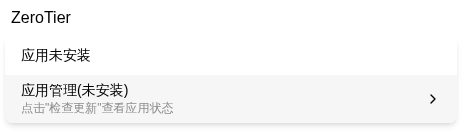
Install it from the App Management row on the same card:
- Click App Management to open the update panel
- Click Check for Updates (one successful check is required before the download entry appears)
- With the app not installed the button reads Download; once the package is downloaded and verified it turns into Install Now — click it to install
- Installation cannot be cancelled, and no device reboot is needed afterwards
Download sources, the full check/download flow and failure reasons: App Management.
Verify: the App not installed notice disappears and the service toggle plus the Network ID input appear.
Enable the Service
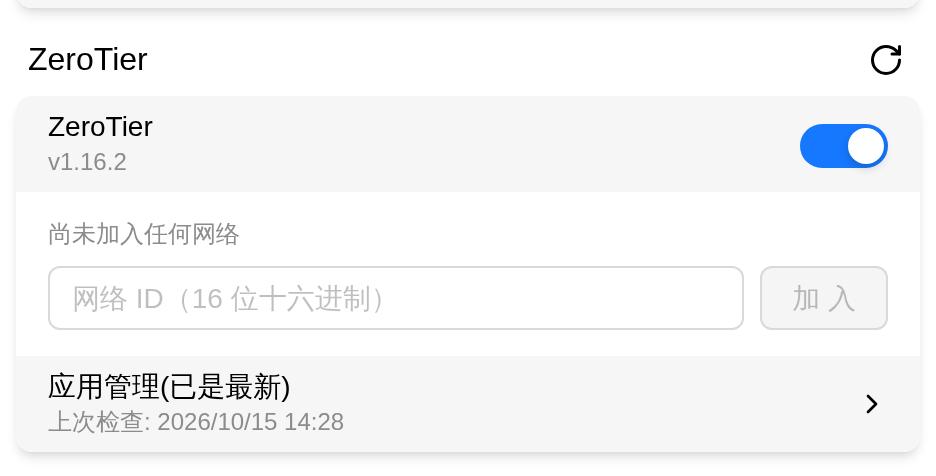
Toggle the switch to enable — it takes effect immediately: the backend starts the zerotier-one daemon on the device. If the app isn't installed the toggle isn't shown at all, so install it first.
Once enabled, the description under the toggle shows the version (e.g. v1.16.2); when a newer version is found it appends (update available), and you can update it from App Management.
Verify: the toggle is on and a refresh icon appears next to the card title (it's absent while the service is disabled).
Join a Network
Enter the 16-digit hexadecimal Network ID in the Network ID field and click Join (pressing Enter in the field works too):
- Copy the Network ID from your network page in ZeroTier Central (16 hex digits, e.g.
b9a18a606f3352e0) - Paste it into the field and click Join
- The join is acknowledged synchronously: the local control plane accepts it right away, and the member configuration is pushed afterwards
The network first shows Requesting configuration, then Ready once the address arrives:
Verify: a
Join Command senttoast appears; the input row collapses into a Detail Info entry whose subtitle readsOnline · 1/1 networks ready.
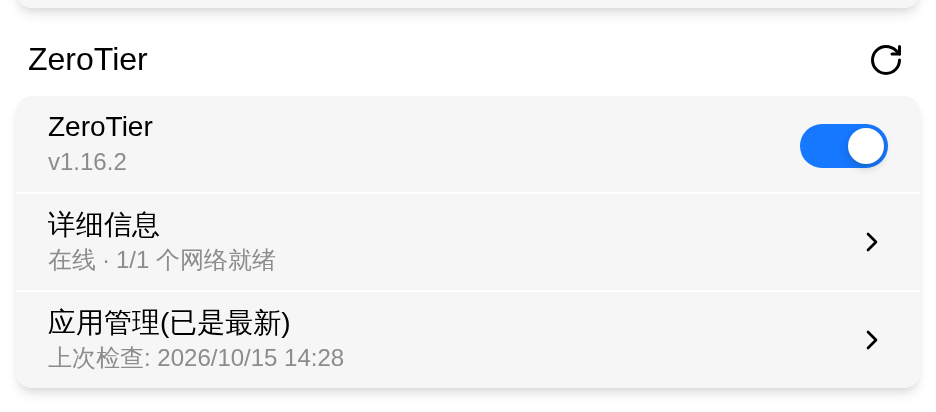
Anything that isn't 16 hex digits is rejected on the spot with Network ID must be 16 hex digits — nothing is sent to the device.
For a private network, the network administrator must authorize this node in ZeroTier Central after it joins; until then the network status stays at Access denied and no member address is assigned.
Only one network is allowed: while nothing is joined the card offers the input field; once joined the field is gone and only the Detail Info entry remains, and the backend rejects a second join as well. To switch networks, Leave the current one first from Detail Info.
Network Options
A ZeroTier network has several member-level options: whether to accept addresses and routes from the control plane, whether to allow a default route, whether to allow global addresses, and so on. The settings page exposes none of these switches — FlexKVM fixes them when the device joins:
| Option | Value at join | Why |
|---|---|---|
| Accept managed addresses and routes | Left at its default (on) | The member address and the interface route for that subnet come from it; turning it off leaves the network with no IP |
| Default route | Forced off | A default route inside the tunnel would cut off the management path |
| Global addresses | Forced off | Global addresses never enter the tunnel |
| DNS pushed by the network | Forced off | ZeroTier never rewrites the device's DNS settings |
These values are written into the device's local configuration for that network and survive a restart.
In short: no route or DNS takeover — neither a default route nor global addresses enter the tunnel, and DNS is never rewritten; but addresses still arrive — the member address and the interface route for that subnet work normally.
If you ever need to change these options (troubleshooting or secondary development), the control endpoint is still there, it just isn't exposed in the settings page.
Detail Info
The Detail Info entry on the card collects this node's connection facts and the joined network. It only appears when the service is enabled and a network has been joined (its subtitle reads Online/Offline · x/y networks ready):
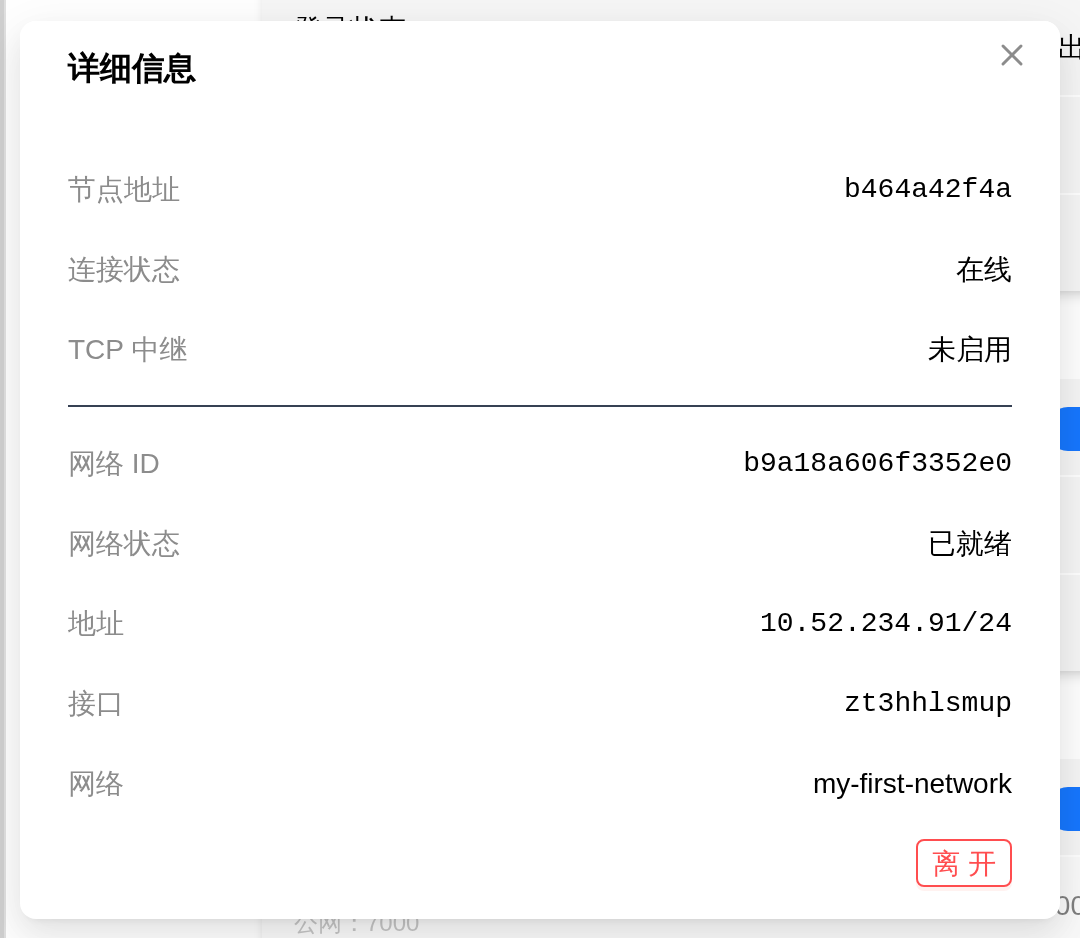
| Field | Description |
|---|---|
| Node Address | This node's 10-digit hexadecimal ZeroTier address; empty while the service is disabled |
| Connection status | Online = connected to at least one root or peer; Offline = none reachable |
| TCP Relay | Enabled = UDP is completely blocked, so ZeroTier's TCP relay fallback is in use (it works, but with higher latency); normally Disabled |
| Network ID | The network's 16-digit number |
| Network status | Member status, see the table below |
| Address | Member address assigned by the control plane (with mask, e.g. 10.52.234.173/24); shows No address assigned yet until it arrives |
| Interface | The TAP interface name on this device (e.g. zt3hhlsmup) |
| Network | Network name (sent by the control plane; the row is hidden when there is no name) |
Network status values:
| Status | Meaning |
|---|---|
| Ready | Member configuration delivered — reachable at the address |
| Requesting configuration | Just joined, waiting for addresses and routes |
| Access denied | Private network; this node hasn't been authorized in the console yet |
| Network not found | The Network ID doesn't exist (usually a typo) |
| Interface error | Creating the TAP interface on this device failed |
| Client too old | The control plane requires a newer zerotier-one |
| Authentication required | The control plane asks for authentication |
| Unknown status | The control plane returned a word the UI doesn't know; shown as-is |
Status isn't pushed in real time: the backend polls the local control plane every 3 seconds (sped up to 500ms for 30 seconds after a join or leave), so address assignment and the switch to Ready can lag a few seconds. Click the refresh icon next to the card title to query immediately.
Peer List
ZeroTier is a peer-to-peer network: which nodes this device is connected to and over which path (direct UDP or a relay) is described by its peers — address, role, version, latency and path list.
The settings page has no peer list. Peer data comes from the WS endpoint (
event_typezerotier,typepeers, login required); it is the raw array returned by the local control plane, and its fields vary with the zerotier-one version. For day-to-day remote access you only need the Address from Detail Info, not the peer list.
Remote Access
Once the device has joined a network and has a member address, install ZeroTier on the device you want to access FlexKVM from and join the same network (private networks need authorization there too). Then:
- Web interface:
https://<member address>(e.g.https://10.52.234.173) - SSH:
ssh <username>@<member address>
Traffic goes over that network's TAP interface on the device and has nothing to do with the settings web UI — with both ends on the same network, access feels like being on the same cable, through NAT and firewalls.
Leave a Network
Open Detail Info and click Leave under that network:
The device tears down the network's TAP interface and address and removes the network from its member table.
Verify: a
Leave Command senttoast appears; the card returns to its unjoined shape — Not joined to any network yet and the Network ID input come back, and the Detail Info entry disappears. To switch networks, just enter the new Network ID now.
App Management
The App Management row on the card is the online update entry for the ZeroTier package (independent from Tailscale and frp). It offers:
| Action | Description |
|---|---|
| Download Source | GitHub / Gitee; switching sources clears the downloaded package and the online info, so you must check for updates again |
| Check for Updates | Pulls the latest version info from the current source; the row shows the last check time |
| Download | Downloads the package and verifies its integrity (progress, speed and remaining time shown; can be cancelled) |
| Install Now | Appears after verification passes; installation cannot be cancelled and rolls back on failure |
| Uninstall | Only shown when installed; stops the service and deletes the app files (including the install-time backup) |
Uninstalling sets the service toggle back to off; after reinstalling you must turn it on again manually.
Each app has a single task slot: only one of check/download/install/uninstall can run at a time, and any further click reports Another update task is running, try again later.
Full flow (every status and failure reason): App Management.
Troubleshooting
| Symptom | Likely cause | Try this first |
|---|---|---|
| Card shows App not installed, no toggle | The ZeroTier package isn't on the device (not installed, or signature check failed) | Install it from App Management on the card after checking for updates |
| Network ID must be 16 hex digits | Wrong network number: bad length or non-hex characters | Copy the full 16-digit Network ID from ZeroTier Central |
| Network status stays at Requesting configuration | Member configuration hasn't been pushed yet (normally a few seconds) | Wait a few seconds; click the refresh icon next to the card title |
| Network status Access denied | Private network, node not authorized in the console | Authorize the node in the ZeroTier Central member list |
| Network status Network not found | The Network ID doesn't exist | Double-check the Network ID you entered |
| Join fails saying another network is already joined | Only one network is allowed | Leave the current network from Detail Info, then join the new one |
| Join fails saying the service isn't enabled | The daemon isn't running (toggle off) | Turn the service toggle on and retry |
| Toggle is on but the description says Service is not running | The zerotier-one process died | Toggle the switch off and on to restart it; if it still won't run, reinstall the app |
| TCP Relay shows Enabled | UDP is completely blocked, so the TCP fallback is used | Check whether your network blocks outbound UDP; the relay works but adds latency |
| Status changes very slowly | Status comes from a 3-second poll, not a push | Click the refresh icon next to the card title |
| Service is enabled but there's no Detail Info entry | No network has been joined yet | Enter a Network ID and click Join |
| Can't connect remotely | Control device has no ZeroTier, joined a different network, or the private network isn't authorized | Join the same network on the control device and confirm the member address is reachable |